Tidy Up Documents Faster, Let Productivity Soar
Through the delivery of this material, Ditgrasi USU hopes that students, lecturers, and education personnel can maximize basic Microsoft Word features to improve work precision and speed.
Article
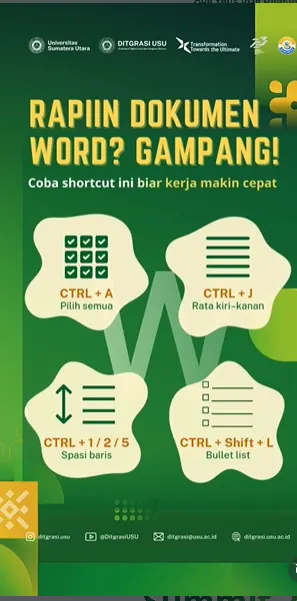
Through the latest digital poster released on its official Instagram page, the Directorate of Digitalization and System Integration (Ditgrasi) at Universitas Sumatera Utara (USU) educates the USU academic community (sivitas akademika) regarding various Microsoft Word shortcuts that can be utilized to draft documents more efficiently.
Some of the main shortcuts featured include:
1. CTRL + A – Select All Used to select the entire document content instantly, facilitating overall formatting or style adjustments.
2. CTRL + J – Justify This shortcut helps users make paragraphs look neater and more professional; it is frequently used in writing reports, papers, and other academic documents.
3. CTRL + 1 / 2 / 5 – Line Spacing Settings Users can adjust line spacing quickly—ranging from single spacing (CTRL + 1), double spacing (CTRL + 2), to 1.5-line spacing (CTRL + 5).
4. CTRL + Shift + L – Automatic Bullet List Simplifies the creation of bullet points instantly, making it highly useful when compiling summaries, task lists, or other key points.
Through the delivery of this material, Ditgrasi USU hopes that students, lecturers, and education personnel can maximize basic Microsoft Word features to improve work precision and speed. This effort also supports USU's digital transformation agenda, which focuses on improving the quality of technology-based services.